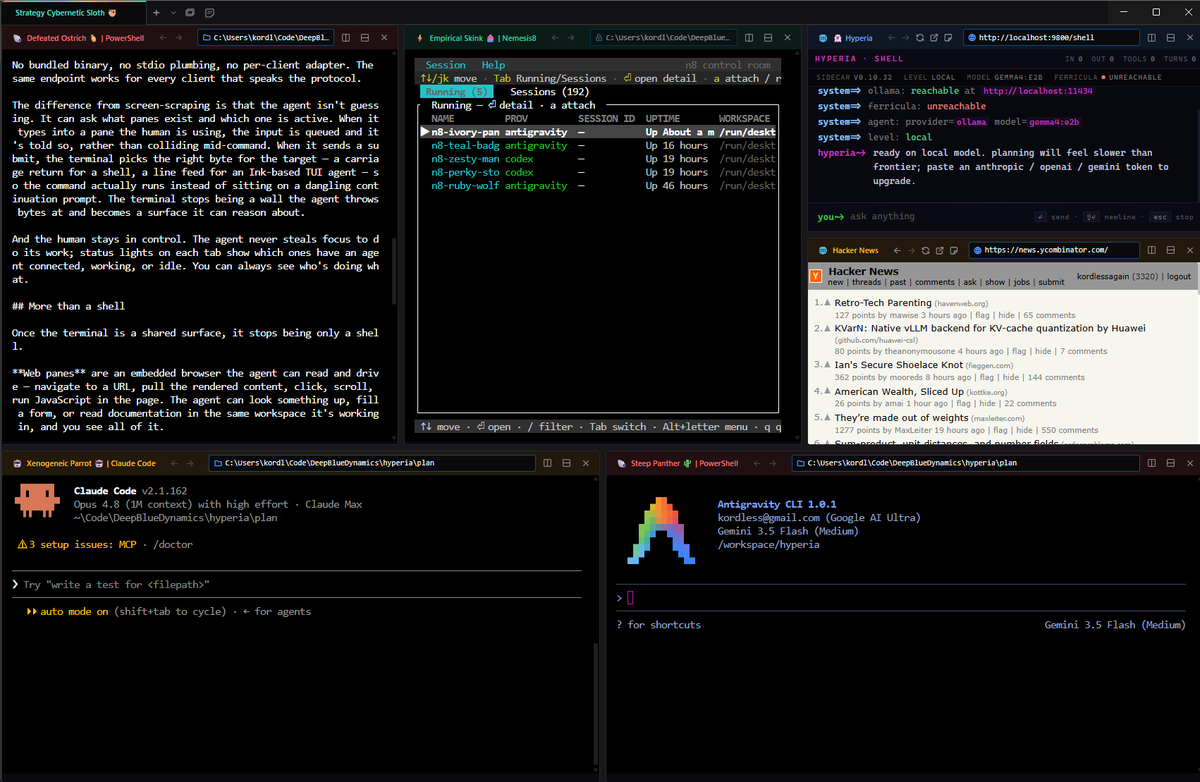
The terminal was designed for one operator. One pair of hands, one pair of eyes, one cursor blinking in one shell. Every assumption baked into it — the prompt, the scrollback, the foreground process — assumes a single human driving.
That assumption broke the moment agents showed up. An AI working in a terminal today is mostly guessing: scraping the screen, typing blind, hoping the bytes it sent landed in the right place, with no idea which pane is busy or what the human is doing two tabs over. It works until it doesn't, and when it doesn't, it does so silently.
Hyperia — github.com/DeepBlueDynamics/hyperia — is a terminal rebuilt for two operators, a human and an agent, sharing the same surface, each able to see what the other is doing.
Forked from Hyper, written in Electron
Hyperia is a fork of Hyper — Vercel's terminal emulator and one of the most popular cross-platform terminals ever shipped. Hyper had the right bones for what we needed: cross-platform from day one, a real plugin model, a UI layer that wasn't a 1970s ANSI grid frozen under a coat of paint.
Yes, it's Electron. Hear us out.
The "Electron is bloated" complaint is real but mostly priced in: a flat RAM cost at startup that hasn't actually moved in years while everything else around it has. What you get in return is the thing that made this design possible at all.
A second operator on the terminal needs a UI surface, not just a TTY. Status lights on each tab showing which panes have an agent connected. Floating sticky notes. An embedded browser the agent can read and click. A live code preview that hot-reloads when a file changes on disk. None of those are things you can graft onto a native terminal toolkit without writing half a browser from scratch — and at that point, you've written Electron, badly.
Building on Chromium gives us the rendering, the layout engine, the JavaScript runtime the agent uses to drive web panes, GPU acceleration, modern input handling, and the ability to ship the same binary to Windows, macOS, and Linux from the same codebase. Hyper proved the model works for a terminal. We extended it for an agent.
The shell itself still runs in a real PTY. The Electron part is the chrome around it — the part you actually want to be a browser.
Agents as peers, not screen-scrapers
Hyperia runs a Rust sidecar that exposes the terminal as an MCP server over plain HTTP. Any MCP-capable client — Claude Code, OpenAI Codex, Google Antigravity — connects to one URL and operates the terminal as a first-class participant: open tabs and windows, split panes, run commands, read the actual screen contents, send keystrokes, rename and focus and close panes.
Connecting is one line:
claude mcp add --transport http hyperia http://localhost:9800/mcpNo bundled binary, no stdio plumbing, no per-client adapter. The same endpoint works for every client that speaks the protocol.
The difference from screen-scraping is that the agent isn't guessing. It can ask what panes exist and which one is active. When it types into a pane the human is using, the input is queued and it's told so, rather than colliding mid-command. When it sends a submit, the terminal picks the right byte for the target — a carriage return for a shell, a line feed for an Ink-based TUI agent — so the command actually runs instead of sitting on a dangling continuation prompt. The terminal stops being a wall the agent throws bytes at and becomes a surface it can reason about.
And the human stays in control. The agent never steals focus to do its work; status lights on each tab show which ones have an agent connected, working, or idle. You can always see who's doing what.
More than a shell
Once the terminal is a shared surface, it stops being only a shell.
Web panes are an embedded browser the agent can read and drive — navigate to a URL, pull the rendered content, click, scroll, run JavaScript in the page. The agent can look something up, fill a form, or read documentation in the same workspace it's working in, and you see all of it. They're also where you live-test the thing you're building: open localhost:3000 in a pane next to the editor, agent reloads it as you save.
By design these web panes can't reach Google. The embedded browser isn't signed the way Chrome, Edge, and Safari are — Hyperia itself is code-signed for Windows and macOS, but it's not signed as a consumer browser, and Google (rightly) refuses sign-in to anything that isn't. Logging into your Google account is a job for the mainstream browsers. Reading a doc page, clicking through a form, driving a localhost preview — that's what these panes are for.
Sticky notes are floating, persistent notes — including file-linked code notes that render a source file with syntax highlighting and live-update when the file changes on disk. An agent can drop a note, pin a snippet, or surface a file for you to look at, and the notes survive restarts.
A built-in agent lives in the app itself, and the terminal keeps a local, searchable index of your shell history and your notes — so an agent, built-in or connected, can search what you actually ran and wrote, not just the few lines still on screen.
It ships, signed
Hyperia builds for Windows, macOS, and Linux from CI on a tagged push, and the binaries are real releases: the Windows installer is Authenticode-signed via Azure Trusted Signing, and the macOS app is signed with a Developer ID and notarized by Apple — both produced end-to-end by the pipeline, not bolted on afterward. There are unsigned nightly builds for anyone who wants to track the edge.
Where this is
Hyperia is early — version 0.10, moving fast, with rough edges we're still filing down. It is not trying to replace your shell's muscle memory; your prompt, your aliases, your profiles all still work exactly as they did. What it adds is a second seat at the same terminal, and the wiring that lets an agent take it without flying blind.
The terminal has been a single-operator tool for fifty years. It doesn't have to stay one.
Hyperia is built by Deep Blue Dynamics. Source and releases: github.com/DeepBlueDynamics/hyperia.
// transmission ends